FEATURES
Every feature here earns its place. If it creates more friction than it removes, it doesn't ship. If it duplicates what you can already see, it doesn't ship. Here's what makes the cut — and how each one works.
ONE SCREEN. EVERYTHING YOU NEED.
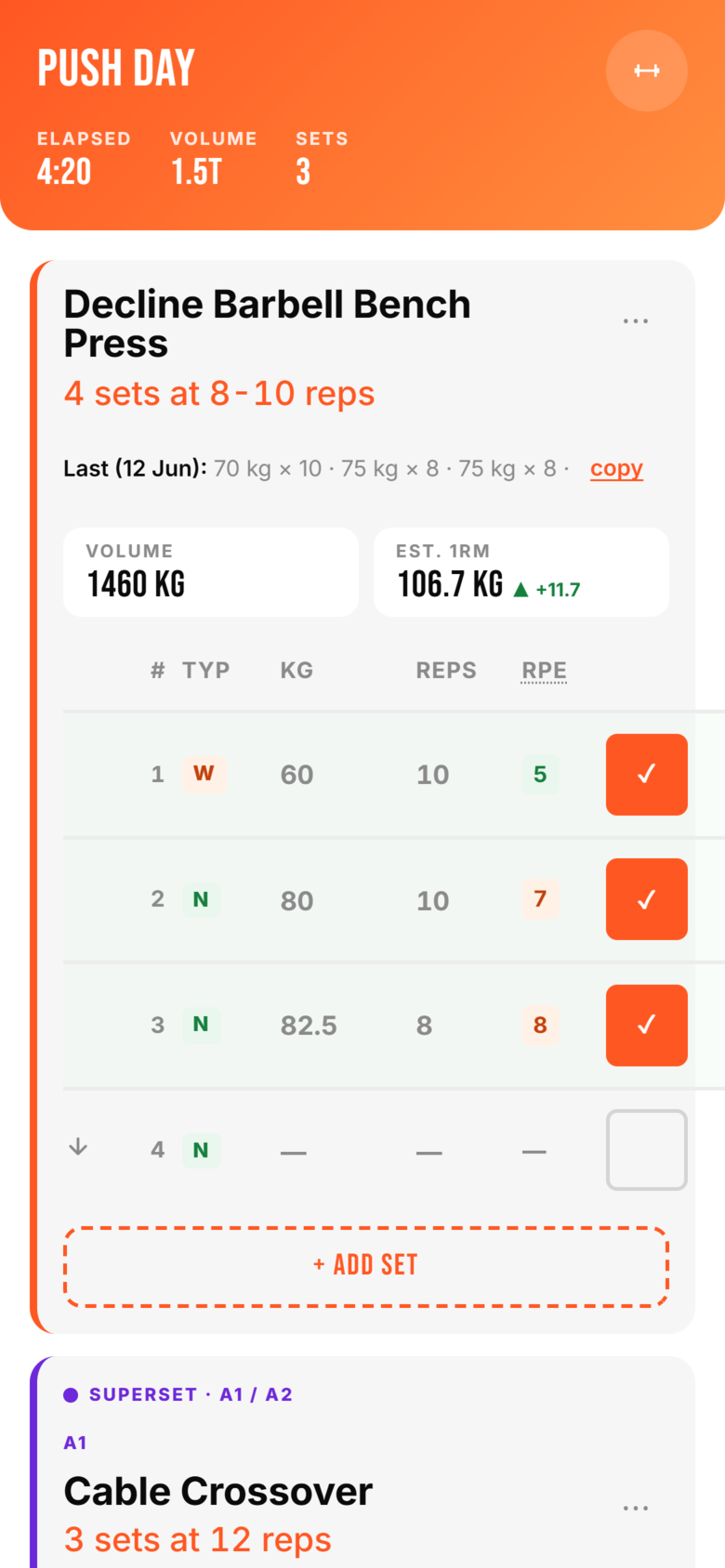
The Active Workout screen is the most-used surface in the app. Previous performance at the top of every exercise card, set rows you tap once to commit, and live totals in the header that update with every tick. Designed for one-handed use between sets.
- Last session's reps and weights at the top of every card — one tap to copy them down
- Or load a whole routine exactly as you performed it last time — every set, warm-ups included
- A green ▲ win marker the moment a set beats last session's matching set — heavier, more reps, longer, or further. Small wins, caught every time
- Live volume + estimated 1RM after every set — watch your numbers climb
- Sticky header with elapsed time, session volume, and sets completed
- Add, delete, or copy-down sets as you go — every row adapts to how the lift actually went
- Logged sets lockable to prevent accidental taps — your data stays safe while you load the next plate
- Open any exercise's how-to mid-workout — instructions, tips, and form cues without leaving the session
- Swap, add, or remove exercises mid-session without touching your routine — a temporary swap reverts to the original next time you load it
THREE WAYS TO BEGIN.
However you want to train today, the home screen gets you there in a tap. Pull up a saved routine, start blank and build it on the fly, or repeat your last session and pick up right where you left off.
- From an existing routine — every planned exercise and target set, ready to fill in
- Blank workout — start empty and add exercises on the fly for an improvised session
- Repeat last workout — one tap clones your most recent completed session (exercises, sets, weights, reps) into a fresh, standalone workout
EVERY SET, IN CONTEXT.
Set types tell the story of the session at a glance — warmup, working, drop, failure. Effort tracking layers on top: pick RPE 1–10 or RIR 0–9 in Settings, log it inline, and the colour-coded pill tells you how hard each set was without making you do the maths.
- Tap the type pill to cycle W → N → D → F
- Pick RPE or RIR per profile — both stored, switch any time
- Green / amber / red effort pill on every completed set
- Effort tracking is fully optional — switch it off in Settings any time
REPS, TIME, OR DISTANCE.
Every exercise works the way it should. Barbell work logs weight and reps. Holds and static exercises log time with a built-in per-set timer. Cardio machines log distance. Each measure type gets its own input layout — no shoehorning one format into another.
- Reps: weight + rep count, with copy-down from the previous set
- Time: inline start/stop timer per set, with a full-screen overlay while it runs
- Distance: numeric input with your preferred unit (m, km, mi)
Bench Press
Last (Mon): 60×10 · 80×8 · 80×8
| # | TYP | KG | REPS | ||
|---|---|---|---|---|---|
| 1 | N | 60 | 10 | ✓ | |
| 2 | N | 80 | 8 | ✓ | |
| 3 | N | 80 | — |
Plank
Last (Mon): 1:00 · 0:45 · 0:45
| # | TYP | TIME | |||
|---|---|---|---|---|---|
| 1 | N | 1:00 | ✓ | ||
| 2 | N | 0:45 | ✓ | ||
| 3 | N | 1:00 | |||
Row Erg
Last (Mon): 1000 m · 500 m
| # | TYP | DIST | |||
|---|---|---|---|---|---|
| 1 | N | 1000m | ✓ | ||
| 2 | N | 500m | |||
RAMP UP WITHOUT THE MATHS.
Tap WARM-UP on any barbell or weighted exercise, pick how many ramp sets you want, and RepTrack builds a plate-rounded climb up to your working weight — injected as Warmup rows above your working sets. If the weight's too light to bother, it tells you instead of adding junk sets.
- Choose 1–5 warm-up sets (default 3)
- Each set rounds to real plates on your bar
- “No warm-up needed for this weight” when you're already near the bar
Bench Press
🔥 WARM-UPWARM-UP RAMP
How many warm-up sets?
| 1 | W | 20 | 8 |
| 2 | W | 40 | 5 |
| 3 | W | 60 | 3 |
| 4 | N | 80 | 8 |
3 warm-ups ramping to your 80 kg working set.
COUNTDOWN THAT WAITS FOR YOU.
Rest timer fires the moment you tick a set, displayed as a sticky banner you can't miss. Sound and vibration when it expires (both toggleable). +30s if you need a bit more, Skip if you don't.
- Configure per exercise in the routine, or set ad-hoc in a freeform session
- Sound + vibration on expiry — both toggleable in Settings
- +30s and Skip buttons always one tap away
REST TIMER
SkipNO MORE MENTAL MATHS.
Set the target weight you want on the bar, see exactly which plates go on each side. Real Olympic plate colours so the visual matches what you're loading. Bar weight is configurable in Settings — 15 / 20 / 25 kg or any value you set.
- Set a target weight, get a per-side stack
- Real Olympic plate colours so the visual reads at a glance
- Bar weight defaults to 20 kg, override anywhere
PLATE CALCULATOR
DoneLIGHT WEEKS THAT DON'T LIE TO YOU.
Planned light sessions shouldn't pollute your PRs or your volume trend. Flag a session as deload on the Finish screen and it's saved normally — but excluded from PR detection, from the volume charts, and from the progressive-overload nudge. A blue DELOAD pill marks it in your history.
- Toggle on the Finish screen — no separate workflow
- Excluded from PR detection, volume trends, and overload nudges
- Blue left border + DELOAD pill in history so you can spot them at a glance
Push Day
12 MayPush Day
19 MayPush Day
26 MayEVERY WIN, CAUGHT AND CELEBRATED.
Hit a new best weight or a new estimated 1RM and RepTrack catches it as it happens, then recaps it on the finish screen and logs it into your PR feed. Capped your rep range two sessions in a row? Get a passive nudge — a gentle 'maybe add weight next time?'
- Best weight + best estimated 1RM per exercise, detected automatically
- Progressive-overload nudge after two consecutive sessions at the rep ceiling
- Deload sessions never produce PRs, by design
New Personal Record
BENCH PRESS · 87.5 KG × 5
Est. 1RM 102.1 kg
Squat
You've hit the top of your rep range 3 sessions in a row. Consider increasing the weight next session.
THE LONG VIEW.
Beyond the session: weekly volume over the last 4 / 12 / 26 / 52 weeks, a flat PR log ordered by most recent, exercise-by-exercise 1RM trends, and a muscle-balance breakdown that flags when your push-pull ratio gets lopsided. Deload sessions are excluded from every chart.
- Period selector: 4W / 12W / 6M / 1Y
- Volume by muscle, sorted descending
- Per-exercise 1RM trend with touch-draggable tooltips
- Push/pull balance warning when the ratio drifts
THIS WEEK VS LAST WEEK.
Run the same routine twice and RepTrack diffs the two sessions for you. Pick a baseline (A) and your latest (B) and see exactly what moved — working volume, estimated 1RM, and a per-exercise verdict — across a quick Summary, a set-by-set Detailed table, and a Gains dashboard.
- Per-routine — choose any two completed sessions as A (baseline) vs B (latest)
- Summary verdict — PROGRESSING, HOLDING, or SLIPPING, with volume % and exercises up/down
- Detailed view diffs every set side by side, with Δ and Δ estimated 1RM
- Gains dashboard surfaces your biggest gain and flags anything that regressed
EVERY SESSION, AT A GLANCE.
The history page gives you two views of the same data. The calendar shows your training frequency at a glance — orange for a normal session, blue for a deload. Tap any day to open that session's full detail. Below it, every session listed chronologically with duration, volume, and set count.
- Calendar view — training frequency visible at a glance, colour-coded by session type
- Tap any past date to log a historic workout you forgot to record
- Session list with duration, volume, and set count on every row
Push Day
29 MayPull Day
28 MayLeg Day
26 MayPush Day
24 MayEVERYTHING YOU MIGHT LIFT.
A seeded library covering every common piece of gym equipment, searchable and filterable by body part, equipment, or 'Custom'. Add your own when something's missing — share it with the group or keep it private. Spotted a wrong instruction or muscle list? Flag it and a curator will fix it.
- Search by name; filter by body part, equipment, or Custom
- Add custom exercises with full metadata — share or keep private
- Report-an-issue affordance on every detail page, no public flag counts
- Each exercise has a personal-best card and 1RM trend chart
50+ exercises
EXPORT IT. INSTALL IT. OWN IT.
Settings → Export downloads four CSVs covering every set, every PR, every routine, and every custom exercise. UTF-8, plain CSV, no proprietary format. The app itself installs as a PWA — add to home screen on iOS or Android and it runs like any native app, with mid-workout offline resilience.
- CSV export: workouts, personal records, routines, custom exercises
- PWA install on iOS Safari and Android Chrome — full-screen launcher
- Sets queue and sync when signal drops mid-workout
- Account delete: 30-day soft delete or immediate GDPR hard delete
Data
Export all data
Workouts, PRs, routines, custom exercises — 4 CSVs in a ZIP
Manage data
App
Install app
Add to home screen for a native-app feel
Sign in and start tracking, or read the guide if you want a deeper walk-through of each feature.